 Home
Home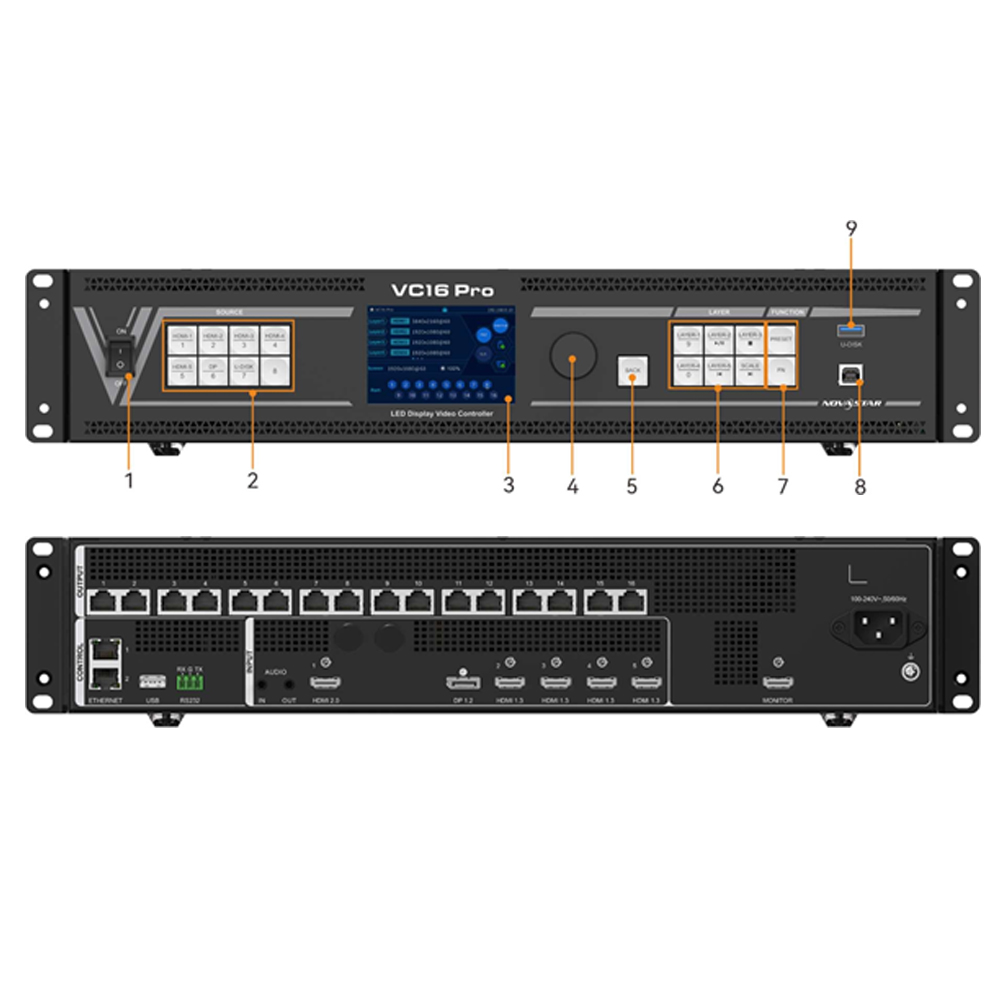
NovaStar VC16 Pro
฿120,000.00
- เครื่อง รับ – ส่ง สัญญาณภาพ NovaStar VC16 Pro
- รองรับความละเอียดได้สูง 10.4 M pixel
- รองรับการเชื่อมต่อและส่งออก RJ45 ได้ 16 ช่อง
- มีช่องเชื่อมต่อ HDMI
- มีเมนูภาษาอังกฤษ
- Brochure : VC16 Pro All-in-One Controller Specifications-V1.0.0
หมายเหตุ : กรุณาเช็คสินค้าก่อนทำการสั่งซื้อทุกครั้ง เพราะบางรายการอาจไม่มีสินค้าในสต็อก



NovaStar VC16 Pro All in one controller
The VC16 Pro is an all-in-one controller combining video processing and video control functionalities into a single device. Capable of managing up to 10.4 million pixels, the VC16 Pro can output at a maximum width of 16,384 pixels and a height of 8,192 pixels, making it perfectly suited for controlling ultra-wide and ultra-high LED screens on-site.
The VC16 Pro boasts powerful video signal reception and processing capabilities, supporting a maximum resolution of 4K×2K@60Hz for video input. It can handle multiple video signal inputs and includes features like 12 layers, output scaling, and pixel-level brightness and chroma calibration. These functions combine to deliver outstanding image display quality.
With various control options available, the VC16 Pro can be operated via the front panel knob, NovaLCT and Unico, providing you with a convenient and effortless control experience.
The VC16 Pro is housed in an industrial-grade casing, which, combined with its powerful video processing and transmission capabilities, makes it robust and well-suited for complex operational environments. The VC16 Pro is a perfect fit for medium and high-end rental, stage control systems and fine-pitch LED screens.
Feature NovaStar VC16 Pro
- A comprehensive range of input connectors
- 1x HDMI 2.0
- 1x DP 1.2
- 4x HDMI 1.3
- 1x 3G-SDI (IN & LOOP, optional)
- 1x USB 3.0 (Play images or videos saved in a USB drive.)
- Output connectors
- 16x Gigabit Ethernet ports
- A single device supports up to 10.4 million pixels, delivering a maximum width of 16,384 pixels and a maximum height of 8192 pixels.
- 1x HDMI 1.3
For monitoring display.
- Audio input and output
- Audio input accompanied with HDMI and DP sources
- 3.5 mm independent audio input and output
- Adjustable output volume
- Free topology
- Flexible screen configuration without rectangle restriction on a single Ethernet port.
- The maximum circumscribed rectangle of the large screen loaded by the device must be within the device loading capacity.
- *Specific receiving cards are required.
- Output synchronization
- An input source connected to the device’s video connector can be used as the sync source to ensure the output images of all cascaded units in sync.
- EDID management
- Import and export EDID files. NovaStar VC16 Pro
- Easy preset saving and loading
- Up to 256 user-defined presets supported
- Load a preset by simply pressing one button.
- Save, overwrite and delete a preset.
- Preview the layer layout saved in the preset.
- Multiple layer display
- Supports 12*2K×1K layer resources.
- Users can create layers in three different specifications
- – 4K×2K, 4K×1K, and 2K×1K. These layers will use 4x, 2x, and 1x 2K layer resources respectively,
- depending on the capacity of the input source connector used to open the layers.
- Adjustable layer size and position
- Adjustable layer priority
- Adjustable aspect ratio
- OSD function
- Supports the text OSD and image OSD. For the text OSD, four components are available, including static text OSD, dynamic text OSD, weather OSD and time OSD.
- Supports customization of the text content, font, font color, size, opacity and background color.
- Supports configuration of the scrolling direction, initial position and speed for the dynamic text OSD.
- 3D function
- Connect the EMT200 Pro 3D emitter to the device’s Ethernet port, and use the compatible 3D glasses to enjoy a 3D visual experience.
- Note: When the 3D function is enabled and the video source format is Side-by-Side or Top-and-Bottom, the device output capacity will be halved.
- Personalized image scaling
- Supports three kinds of image scaling modes, including full screen, pixel to pixel and custom.
- Powerful video processing
- Based on SuperView III image quality processing technologies to provide stepless output scaling.
- One-click full screen display
- Free input cropping NovaStar VC16 Pro
- Color adjustment
- Supports output color management, including brightness, saturation, contrast and hue.
- Pixel level brightness and chroma calibration
- Work with NovaLCT and NovaStar calibration software to support brightness and chroma calibration on each LED,
- which can effectively remove color discrepancies and greatly improve LED display brightness and chroma consistency,
- allowing for better image quality. The function of displaying image on screen for test is also supported.
USB playback, timesaving and effortless
- Supports USB playback for instant plug-and-play
Multiple device modes and operation modes, convenient and efficient
- User mode selection supported
- Standard: Only some LCD menu options are displayed, including screen brightness, layer settings, preset settings, display control, USB playback, audio settings, user mode and about us.
- Professional: Display all LCD menu options.
- Multiple control options
- Device front panel knob
- Unico NovaStar VC16 Pro
- Both client software and web page control are supported.
- NovaLCT
Data saving after power failure and backup design, stable and reliable
- End-to-end backup
- Backup between devices
- Backup between input sources
- Backup between Ethernet ports
- Dual receiving card backup
- Ethernet port backup test NovaStar VC16 Pro
- Test whether the pre-stored images, backup Ethernet ports and devices take effect without plugging and unplugging the Ethernet cables.
- Data saving after power failure
- After a normal shutdown or unexpected power outage, reconnecting the power will automatically restore the previously saved settings on the device.
- 24/7 rigorous stability test under extreme high and low temperatures proved robust stability and reliability.
Function Limitation Mutually Exclusive Function 3D • Work with the matched 3D glasses. • When the 3D function is enabled and the video source format is Side-by-Side or Top-and-Bottom, the device output capacity will be halved.
• When the 3D function is enabled and the video source format is Frame Sequential, you need to manually set the output frame rate which must be the same as the input
frame rate.
Input crop NovaStar VC16 Pro OSD • The quantity of the text OSD components is as follows. − Static text OSD: 10
− Dynamic text OSD: 1
− Weather OSD: 2
− Time OSD: 2
• The text OSD and image OSD cannot be used together.
• The dynamic text OSD and other text OSD
components cannot be used together.
N/A NovaStar VC16 Pro
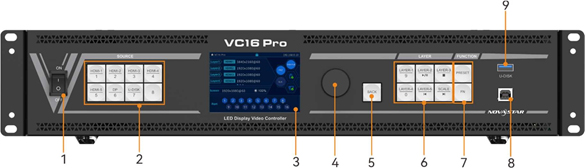
Front Panel of NovaStar VC16 Pro
| No. | Area | Function |
|---|---|---|
| 1 | Power switch | Power switch
• On: Power on the device. • Off: Power off the device. |
| 2 | Input source buttons | • HDMI 1~5/DP: Show the input source status and switch the layer input source.
− On (orange): The input source has a signal. − Flashing (orange): The input source has no signals, but it is used by a layer. − Off: The input source is not used, and no input signal is accessed. • U-DISK: USB source button Press the button to switch to a USB source, while hold down the button to enter the Input Settings screen. On the home screen, when layer 1 is opened, you can press the input source button to quickly switch the input source for layer 1. |
| 3 | LCD screen | Display the device status, menus, submenus and messages. |
| 4 | Knob | • Rotate the knob to select a menu item or adjust the parameter value.
• Press the knob to confirm the setting or operation. |
| 5 | Back button | Exit the current menu or cancel the operation. |
| 6 | Layer buttons | Layer button description: NovaStar VC16 Pro |
| • LAYER 1~5: Open or close a layer, and show the layer status.
− On (orange): The layer is opened. − Flashing (orange): The layer is being edited. − Off: The layer is closed. • When you play media files saved in a USB drive, the layer buttons are used to control the playback. − LAYER-2: This button is used to play or pause the files. − LAYER-3: This button is used to stop the playback. − LAYER-5: This button is used to play the previous file. |
||
| • SCALE: A shortcut button for the full screen function. Press the button to make the layer of the lowest priority fill the entire screen.
− On (orange): Full screen scaling is turned on. − Off: Full screen scaling is turned off. • When you play media files saved in a USB drive, this button is used to play the next file. |
||
| 7 | Function buttons | • PRESET: Access the preset settings menu.
• FN: A custom function button NovaStar VC16 Pro |
| 8 | USB | Connect to the PC installed with NovaLCT for device control. |
| 9 | U-DISK | 1x USB 3.0
• Supports USB playback. − Single-partition USB drive supported − File system: NTFS, FAT32 and exFAT − Max. width and height of media files Width: 3840 pixels, height: 2160 pixels − Picture format: jpg, jpeg, png and bmp − Decoded image resolution: 3840×2160 or lower − Video format: mp4, mkv, mov, avi, flv, m4v, mpg, mpeg, ts − Video coding: H.264, H.265, MPEG-2, MPEG-4 − Max. video frame rate: H.264: 3840×2160@30fps, H.265: 3840×2160@60fps MPEG-2/MPEG-4: 1920×1080@60fps − Max bitrate: H.264/H.265: 100Mbps MPEG-2/MPEG-4: 50Mbps − Audio coding: AAC, AC3, DTS, MP3, DVD, DVD_LPCM, MP2, OPUS |
| − Audio sampling rate: opus: 24kHz, 48kHz
Other formats: 22.05kHz to 94kHz − Transition effect of image switching: Ripple, zoom in, cut out, flip, blinds, H wipe, V wipe, cube, dissolve, grid, swapping, scroll, fade in/out, twirl, heart trans, doorway, perspective triangle, disappear, bounce, pinwheel, random The resolution of a USB source is fixed at 3840×2160@60Hz. |
Rear Panel of NovaStar VC16 Pro

| Input Connectors | ||
|---|---|---|
| Connector | Qty | Description |
| HDMI 2.0 | 1 | 1x HDMI 2.0 NovaStar VC16 Pro
• Max. input resolution: 4096×2160@60Hz • Supported frame rate: 23.98/24/25/29.97/30/47.95/48/50/56/59.94/60/70/71.93/72/75/85/100 /119.88/120/144 • Compatible with HDMI 1.4 and HDMI 1.3 video inputs • Custom resolutions supported − Max. width: 8192 pixels (8192×1080@60Hz) − Max. height: 8188 pixels (1080×8188@60Hz) • Supports 8-bit/10-bit/12-bit video inputs. |
| • Supported color space/sampling rate: RGB 4:4:4/YCbCr 4:4:4/YCbCr 4:2:2/YCbCr 4:2:0.
• HDCP 1.4 and HDCP 2.2 supported • Accompanied audio supported • Does not support interlaced signal inputs. |
||
| DP 1.2 | 1 | 1x DP 1.2
• Max. input resolution: 4096×2160@60Hz • Supported frame rate: 23.98/24/25/29.97/30/47.95/48/50/56/59.94/60/70/71.93/72/75/85/100 /119.88/120/144 • Custom resolutions supported − Max. width: 8192 pixels (8192×1080@60Hz) − Max. height: 8188 pixels (1080×8188@60Hz) • Supports 8-bit/10-bit/12-bit video inputs. • Supported color space/sampling rate: RGB 4:4:4/YCbCr 4:4:4/YCbCr 4:2:2 • HDCP 1.3 supported • Accompanied audio supported • Does not support interlaced signal inputs. |
| HDMI 1.3 | 4 | 4x HDMI 1.3
• Max. input resolution: 1920×1080@60Hz • Supported frame rate: 23.98/24/25/29.97/30/47.95/48/50/56/59.94/60/70/71.93/72/75/85/100/119.88/120 • Custom resolutions supported − Max. width: 2048 pixels (2048×1080@60Hz) − Max. height: 2048 pixels (1080×2048@60Hz) • Supports 8-bit video inputs. • HDCP 1.4 supported • Supported color space/sampling rate: RGB 4:4:4/YCbCr 4:4:4/YCbCr 4:2:2 • Accompanied audio supported • Does not support interlaced signal inputs. |
| 3G-SDI (Optional) | 1 | 1x 3G-SDI
• ST-424 (3G), ST-292 (HD) and ST-259 (SD) standard video inputs supported • Supported protocols: SMPTE 259M, SMPTE 274M, SMPTE 296M, SMPTE |
| 425M-A and SMPTE 425M-B
• Max. input resolution: 1920×1080@60Hz • 3G-SDI loop output supported • Deinterlacing processing supported • 10-bit video inputs supported • Does not support input resolution and bit depth settings. |
||
| *Connector capacity limitations | • SL
− Standard resolution: 1920×1080@60Hz − Custom max width: 2048 (2048×1080@60Hz) − Custom max height: 2048 (1080×2048@60Hz) • DL − Standard resolution: 3840×1080@60Hz/3840×2160@30Hz − Custom max width: 4096 (4096×1080@60Hz) − Custom max height: 3840 (1080×3840@60Hz) • 4K − Standard resolution: 4096×2160@60Hz/8192×2160@30Hz − Custom max width: 8192 (8192×1080@60Hz) − Custom max height: 8188 (1080×8188@60Hz)
If the resolution of an input source is larger than the max width limit of the connector capacity, you need to switch the connector capacity to ensure that the input source can be processed normally. |
|
| Output Connectors | ||
| Connector | Qty | Description |
| Ethernet ports | 16 | • 16x Gigabit Ethernet ports, max device loading capacity: 10.4 million pixels
• Max. width: 16,384 pixels, max. height: 8192 pixels • Maximum capacity of a single port: NovaStar VC16 Pro 8bit: 650,000 pixels • Supported frame rate: 23.98/24/25/29.97/30/47/48/50/59.94/60/71.93/72/75/85/95/100/119.88/120/144 |
| HDMI 1.3 | 1 | For monitoring display
Output resolution: 1920×1080@60Hz (fixed) |
| Audio Connectors NovaStar VC16 Pro | ||
| Connector | Qty | Description |
| AUDIO | 2 | 1x AUDIO input, 1×AUDIO output
• 3.5 mm standard audio input and output connectors • Audio sampling rate up to 48 kHz |
| Control Connectors NovaStar VC16 Pro | ||
| Connector | Qty | Description |
| ETHERNET | 2 | • Connect to the control PC for device control and firmware upgrade via Unico.
Status LEDs: • The top left one indicates the connection status. − On: The port is properly connected. − Flashing: The port is not properly connected, such as loose connection. − Off: The port is not connected. • The top right one indicates the communication status. − On: No data communication. − Flashing: The communication is good and data is being transmitted. − Off: No data transmission NovaStar VC16 Pro |
| USB | 1 | 1x USB 2.0
• Cascade the devices via the USB port and Ethernet port. Up to 5 devices can be cascaded. • Update the firmware via the USB drive. • Import or export device logs and EDID files. |
| RS232 | 1 | 3-pin connectors NovaStar VC16 Pro
• RX: Receive signals. • TX: Send signals. • G: Ground |
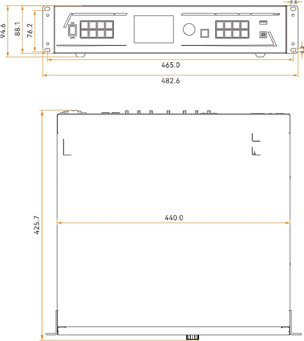
Dimension of NovaStar VC16 Pro
| Electrical Parameters | Power connector | 100-240V~, 50/60Hz |
| Rated power consumption | 67 W NovaStar VC16 Pro | |
| Operating Environment | Temperature | 0°C to 50°C NovaStar VC16 Pro |
| Humidity | 5% RH to 85% RH, non-condensing | |
| Storage Environment | Temperature | -10°C to 60°C |
| Humidity | 5% RH to 95% RH, non-condensing | |
| Physical Specifications | Dimensions | 482.6 mm × 425.7 mm × 94.6 mm |
| Net weight | 6.4 kg | |
| Total weight | 10.1 kg | |
| Packing Information | Carrying case | 625 mm × 560 mm × 195 mm |
| Accessories | 1x Power cord, 1x Ethernet cable, 1x HDMI cable, 1x USB cable, 1x Phoenix connector, 1x Quick Start
Guide, 1x Certificate of Approval |
|
| Packing box | 645 mm × 580 mm × 215 mm | |
| Noise Level (typical at 25°C/77°F) | 45 dB (A) | |
สอบถามเพิ่มเติม
| น้ำหนัก | 10.1 กก. |
|---|---|
| ขนาด | 482 × 425 × 94 เซนติเมตร |
Brand
NovaStar
สินค้าที่เกี่ยวข้อง