 Home
Home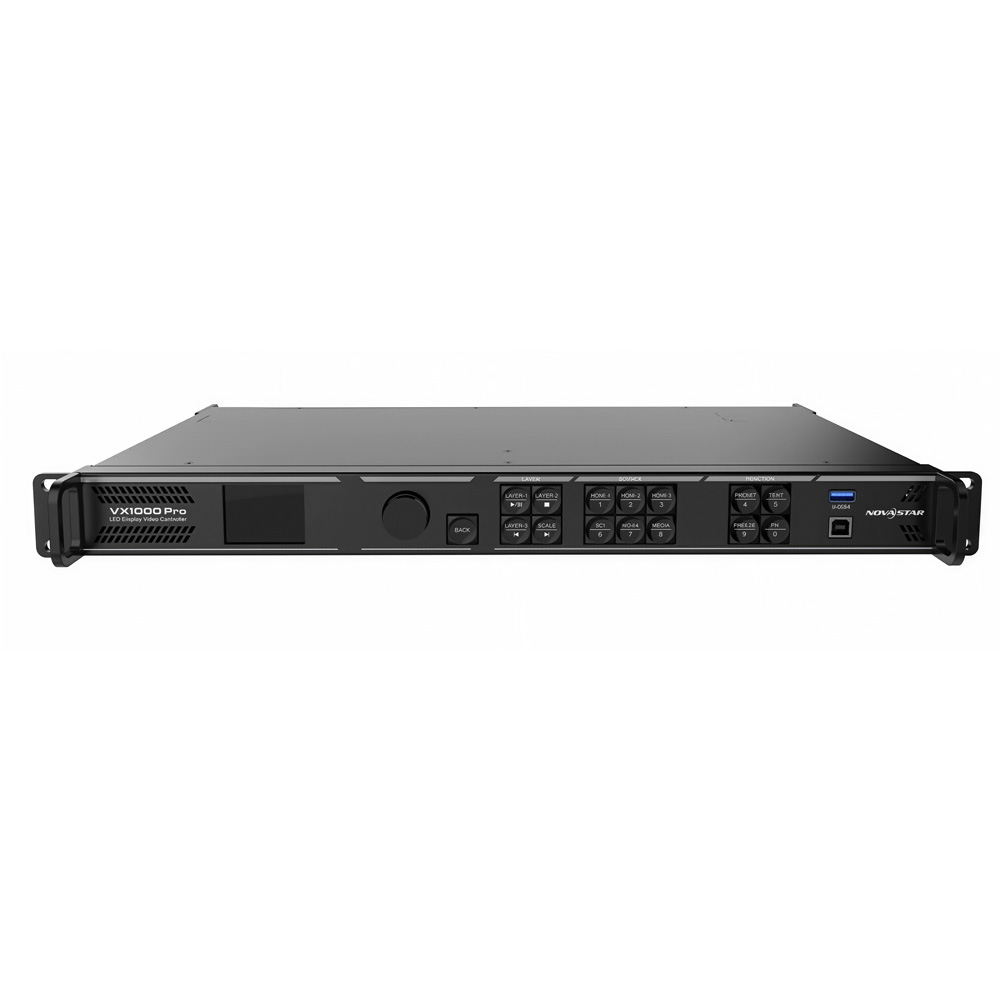
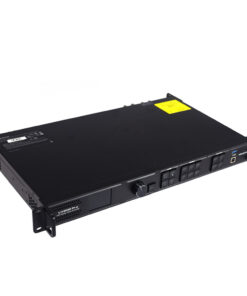
NovaStar VX1000 Pro
฿58,000.00
- เครื่อง รับ – ส่ง สัญญาณภาพ All in one
- NovaStar VX1000 Pro
- ความละเอียด 6,500,000 พิกเซล
- รองรับการเล่นผ่าน USB flash drive
- Brochure : VX1000-Pro-All-in-One-Controller-Specifications-V1.0.1
หมายเหตุ : กรุณาเช็คสินค้าก่อนทำการสั่งซื้อทุกครั้ง เพราะบางรายการอาจไม่มีสินค้าในสต็อก



VDO Processor All in one NovaStar VX1000 Pro
เครื่อง รับ – ส่ง สัญญาณภาพแบบ All in one
- VX1000 Pro เป็นคอนโทรลเลอร์แบบออลอินวัน ที่รวมฟังก์ชันการประมวลผลวิดีโอและการควบคุมวิดีโอไว้ในอุปกรณ์เดียว มาพร้อมพอร์ตอีเธอร์เน็ต 10 พอร์ต รองรับโหมดการทำงานสามโหมด ได้แก่ ตัวควบคุมวิดีโอ ตัวแปลงสัญญาณไฟเบอร์ และบายพาส สามารถจัดการพิกเซลได้สูงสุดถึง 6.5 ล้านพิกเซล โดยสามารถแสดงผลภาพที่มีความกว้างสูงสุด 10,240 พิกเซล และความสูงสูงสุด 8,192 พิกเซล ทำให้เหมาะอย่างยิ่งสำหรับการควบคุมจอ LED อัลตร้าไวด์และอัลตร้าไฮในสถานที่
- VX1000 Pro มีความสามารถในการรับและประมวลผลสัญญาณวิดีโอที่ทรงพลัง รองรับความละเอียดสูงสุด 4K×2K@60Hz สำหรับอินพุตวิดีโอ สามารถจัดการอินพุตสัญญาณวิดีโอได้หลายช่อง และมีคุณสมบัติเช่น 6 เลเยอร์ การปรับขนาดเอาต์พุต ความหน่วงต่ำ และการปรับเทียบความสว่างและสีในระดับพิกเซล ฟังก์ชันเหล่านี้รวมกันเพื่อมอบคุณภาพการแสดงภาพที่ยอดเยี่ยม
- VX1000 Pro มีตัวเลือกการควบคุมที่หลากหลาย สามารถใช้งานได้ผ่านปุ่มหมุนที่แผงด้านหน้า, NovaLCT, เว็บเพจ Unico และแอป VICP ทำให้คุณได้รับประสบการณ์การควบคุมที่สะดวกและง่ายดาย
VX1000 Pro สามารถใช้งานได้ยาวนานเนื่องจากผลิตจากวัสดุระดับอุตสาหกรรม ซึ่งเมื่อรวมกับความสามารถในการประมวลผลและส่งสัญญาณวิดีโอที่ทรงพลัง ทำให้มีความทนทานและเหมาะสมอย่างยิ่งสำหรับสภาพแวดล้อมการทำงานที่ซับซ้อน VX1000 Pro เหมาะอย่างยิ่งสำหรับระบบเช่าระดับกลางและระดับสูง ระบบควบคุมเวที และจอ LED ความละเอียดสูง
ความสามารถของเครื่อง All in one NovaStar VX1000 Pro
-
- โครงสร้างเครือข่ายแบบอิสระ การกำหนดค่าหน้าจอที่ยืดหยุ่นโดยไม่มีข้อจำกัดเรื่องรูปสี่เหลี่ยมผืนผ้าบนพอร์ตอีเธอร์เน็ตเดียว รูปสี่เหลี่ยมผืนผ้าสูงสุดของหน้าจอขนาดใหญ่ที่อุปกรณ์โหลดต้องอยู่ภายในขีดจำกัดความจุของอุปกรณ์
- ความหน่วงต่ำ ด้วยการเปิดใช้งานคุณสมบัติความหน่วงต่ำและโหมดบายพาส ความล่าช้าของอุปกรณ์สามารถลดลงเหลือ 0 เฟรม
- การซิงโครไนซ์เอาต์พุต สามารถใช้แหล่งสัญญาณอินพุตภายในหรือ Genlock ภายนอกเป็นแหล่งสัญญาณซิงค์เพื่อให้แน่ใจว่าภาพเอาต์พุตของทุกหน่วยที่เชื่อมต่อกันนั้นซิงค์กัน
- การจัดการ EDID นำเข้าและส่งออกไฟล์ EDID
- ความเป็นไปได้ในการแสดงผลที่หลากหลายเพื่อการกำหนดค่าที่ยืดหยุ่น
- การบันทึกและโหลดค่าที่ตั้งไว้ล่วงหน้าได้ง่าย
- รองรับค่าที่ตั้งไว้ล่วงหน้าที่ผู้ใช้กำหนดเองได้สูงสุด 256 รายการ
- โหลดค่าที่ตั้งไว้ล่วงหน้าได้ง่ายๆ เพียงกดปุ่มเดียว
- บันทึก เขียนทับ และลบค่าที่ตั้งไว้ล่วงหน้า
- ดูตัวอย่างเค้าโครงเลเยอร์ที่บันทึกไว้ในค่าที่ตั้งไว้ล่วงหน้า
- การแสดงผลหลายเลเยอร์ NovaStar VX1000 Pro
- รองรับทรัพยากรเลเยอร์ 6*2K×1K
- ผู้ใช้สามารถสร้างเลเยอร์ได้ในสามขนาดที่แตกต่างกัน ได้แก่ 4K×2K, 4K×1K และ 2K×1K โดยเลเยอร์เหล่านี้จะใช้ทรัพยากรเลเยอร์ 2K จำนวน 4x, 2x และ 1x ตามลำดับ ขึ้นอยู่กับความจุของตัวเชื่อมต่อแหล่งอินพุตที่ใช้ในการเปิดเลเยอร์
- ปรับขนาดและตำแหน่งของเลเยอร์ได้
- ปรับลำดับความสำคัญของเลเยอร์ได้
- ปรับอัตราส่วนภาพได้
- ฟังก์ชัน 3 มิติ NovaStar VX1000 Pro
- หมายเหตุ: เมื่อเปิดใช้งานฟังก์ชัน 3 มิติ และรูปแบบแหล่งวิดีโอเป็นแบบ Side-by-Side หรือ Top-and-Bottom ความสามารถในการแสดงผลของอุปกรณ์จะลดลงครึ่งหนึ่ง
- การปรับขนาดภาพแบบกำหนดเอง
- รองรับโหมดการปรับขนาดภาพสามแบบ ได้แก่ เต็มหน้าจอ, พิกเซลต่อพิกเซล และกำหนดเอง
- การประมวลผลวิดีโอที่มีประสิทธิภาพ
- ใช้เทคโนโลยีการประมวลผลคุณภาพภาพ SuperView III เพื่อให้การปรับขนาดเอาต์พุตแบบไร้รอยต่อ
- แสดงผลเต็มหน้าจอด้วยคลิกเดียว
- ครอบตัดภาพอินพุตได้อย่างอิสระ
- การปรับสี
- รองรับการจัดการสีเอาต์พุต รวมถึงความสว่าง ความอิ่มตัว ความคมชัด และเฉดสี
- การปรับเทียบความสว่างและความอิ่มตัวของสีระดับพิกเซล
- ทำงานร่วมกับซอฟต์แวร์การปรับเทียบ NovaLCT และ NovaStar เพื่อรองรับการปรับเทียบความสว่างและความอิ่มตัวของสีบน LED แต่ละดวง
- ซึ่งสามารถขจัดความคลาดเคลื่อนของสีได้อย่างมีประสิทธิภาพ และปรับปรุงความสว่างและความสม่ำเสมอของสีของจอแสดงผล LED ได้อย่างมาก ทำให้ได้คุณภาพของภาพที่ดีขึ้น นอกจากนี้ยังรองรับฟังก์ชันการแสดงภาพบนหน้าจอเพื่อทดสอบด้วย
- การเล่นผ่าน USB ประหยัดเวลาและง่ายดาย รองรับการเล่นผ่าน USB เพื่อความสะดวกในการใช้งานแบบเสียบแล้วใช้งานได้ทันที
- โหมดการทำงานต่างๆ ตัวควบคุมวิดีโอ ตัวแปลงไฟเบอร์ บายพาส
- ตัวเลือกการควบคุมหลายแบบ ปุ่มหมุนที่แผงด้านหน้าของอุปกรณ์ การควบคุมผ่านเว็บเพจ Unico NovaLCT แอป VICP
- การบันทึกข้อมูลหลังไฟดับและการออกแบบสำรองข้อมูล เสถียรและเชื่อถือได้
- การสำรองข้อมูลแบบครบวงจร | การสำรองข้อมูลระหว่างอุปกรณ์ | การสำรองข้อมูลระหว่างแหล่งสัญญาณเข้า | การสำรองข้อมูลระหว่างพอร์ตอีเธอร์เน็ต | การสำรองข้อมูลระหว่างพอร์ต OPT และอีเธอร์เน็ต NovaStar VX1000 Pro
- การทดสอบการสำรองข้อมูลพอร์ตอีเธอร์เน็ต ทดสอบว่าภาพที่บันทึกไว้ล่วงหน้า พอร์ตอีเธอร์เน็ตสำรอง และอุปกรณ์ต่างๆ มีผลหรือไม่ โดยไม่ต้องเสียบและถอดสายอีเธอร์เน็ต
- การบันทึกข้อมูลหลังไฟดับ หลังจากการปิดเครื่องตามปกติหรือไฟดับโดยไม่คาดคิด การเชื่อมต่อไฟกลับเข้าไปใหม่จะกู้คืนการตั้งค่าที่บันทึกไว้ก่อนหน้านี้บนอุปกรณ์โดยอัตโนมัติ
- การทดสอบความเสถียรอย่างเข้มงวดตลอด 24 ชั่วโมง 7 วันต่อสัปดาห์ ภายใต้อุณหภูมิสูงและต่ำมาก พิสูจน์ให้เห็นถึงความเสถียรและความน่าเชื่อถือที่แข็งแกร่ง
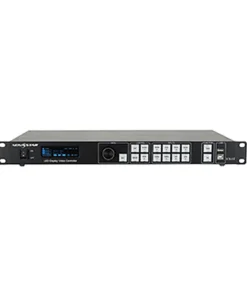
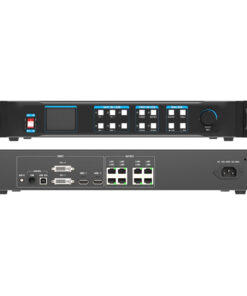
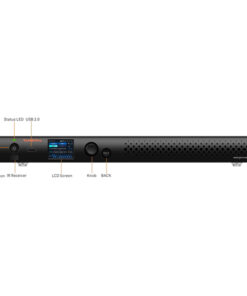
ด้านหน้าเครื่อง NovaStar VX1000 Pro
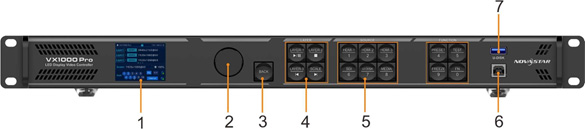
| No. | Area | Function |
|---|---|---|
| 1 | LCD screen | Display the device status, menus, submenus and messages. |
| 2 | Knob | • Rotate the knob to select a menu item or adjust the parameter value.
• Press the knob to confirm the setting or operation. |
| 3 | Back button | Exit the current menu or cancel the operation. |
| 4 | Layer buttons | Layer button description: NovaStar VX1000 Pro
• LAYER 1~3: Open or close a layer, and show the layer status. − On (blue): The layer is opened. − Flashing (blue): The layer is being edited. |
| No. | Area | Function NovaStar VX1000 Pro |
| − On (white): The layer is closed. NovaStar VX1000 Pro
• When you play media files saved in a USB drive, the layer buttons are used to control the playback. − LAYER-1: This button is used to play or pause the files. − LAYER-2: This button is used to stop the playback. − LAYER-3: This button is used to play the previous file. |
||
| • SCALE: A shortcut button for the full screen function. Press the button to make the layer of the lowest priority fill the entire screen. NovaStar VX1000 Pro
− On (blue): Full screen scaling is turned on. − On (white): Full screen scaling is turned off. • When you play media files saved in a USB drive, this button is used to play the next file. |
||
| 5 | Input source buttons | • Show the input source status and switch the layer input source.
• Button indicators are used to indicate the working status of the input source signal. − White, always on: Input source is not used, and no input signal is accessed. − Blue, fast flashing: Input source is used, but no input signal is accessed. − Blue, slow flashing: Input source is not used, but input signal is accessed. − Blue, always on: Input source is used, and input signal is accessed. • U-DISK: USB playback button Hold down the button to enter the media playback control screen, while press the button to switch the layer input source. • MEDIA: USB player button Press the button to enter the USB player screen. NovaStar VX1000 Pro On the home screen, when layer 1 is opened, you can press the input source button to quickly switch the input source for layer 1. |
| 6 | Function buttons | • PRESET: Access the preset settings menu.
• TEST: Access the test pattern menu. • FREEZE: Freeze/unfreeze the output image. • FN: A custom function button |
| 7 | USB | Connect to the PC installed with NovaLCT for device control. |
| 8 | U-DISK | 1x USB 3.0 |
| • Supports USB playback.
− Single-partition USB drive supported − File system: NTFS, FAT32 and exFAT − Max. width and height of media files Width: 3840 pixels, height: 2160 pixels − Picture format: jpg, jpeg, png and bmp − Decoded image resolution: 3840×2160 or lower − Video format: mp4 − Video coding: H.264, H.265 − Max. video frame rate: H.264: 3840×2160@30fps, H.265: 3840×2160@60fps − Audio coding: AAC-LC − Audio sampling rate: 8kHz, 16kHz, 44.1kHz, 48kHz − Transition effect of image switching: Ripple, zoom in, push, flip, blinds, H wipe, V wipe, cube, dissolve, grid, swapping, scroll, fade in/out, twirl, heart trans, curtains, perspective triangle, disappear, bounce, star rotation • Update the firmware via the USB drive. The resolution of a USB source is fixed at 1920×1080@60Hz. |
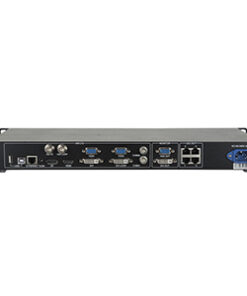
ด้านหลังเครื่อง NovaStar VX1000 Pro

| Input Connectors | ||
|---|---|---|
| Connector | Qty | Description |
| HDMI 2.0 | 1 | 1x HDMI 2.0 |
| • Max. input resolution: 4096×2160@60Hz
• Supported frame rate: 23.98/24/25/29.97/30/47.95/48/50/56/59.94/60/70/71.93/72/75/85/100 /119.88/120/144 • Compatible with HDMI 1.4 and HDMI 1.3 video inputs • HDMI 2.0-1 loop out supported • Custom resolutions supported − Max. width: 8192 pixels (8192×1080@60Hz) − Max. height: 8188 pixels (1080×8188@60Hz) • Supports 8-bit/10-bit/12-bit video inputs. • Supported color space/sampling rate: RGB 4:4:4/YCbCr 4:4:4/YCbCr 4:2:2. • HDCP 1.4 and HDCP 2.2 supported • Accompanied audio supported • Does not support interlaced signal inputs. |
||
| HDMI 1.3 | 2 | 2x HDMI 1.3
• Max. input resolution: 1920×1080@60Hz • Supported frame rate: 23.98/24/25/29.97/30/47.95/48/50/56/59.94/60/70/71.93/72/75/85/100 /119.88/120 • Custom resolutions supported − Max. width: 2048 pixels: 2048 pixels (2048×1080@60Hz) − Max. height: 2048 pixels 2048 pixels (1080×2048@60Hz) • Supports 8-bit video inputs. • HDCP 1.4 supported • Supported color space/sampling rate:: RGB 4:4:4/YCbCr 4:4:4/YCbCr 4:2:2 • Accompanied audio supported • Does not support interlaced signal inputs. |
| 3G-SDI | 1 | 1x 3G-SDI
• ST-424 (3G), ST-292 (HD) and ST-259 (SD) standard video inputs supported • Supported protocols: SMPTE 259M, SMPTE 274M, SMPTE 296M, SMPTE 425M-A and SMPTE 425M-B • Max. input resolution: 1920×1080@60Hz • 3G-SDI loop output supported • Deinterlacing processing supported • 10-bit video inputs supported |
| • Does not support input resolution and bit depth settings. | ||
| Output Connectors | ||
| Connector | Qty | Description |
| Ethernet ports | 10 | • Max. loading capacity: 6.5 million pixels
• Max. width: 10,240 pixels, max. height: 8192 pixels • A single port loading capacity: 650,000 pixels (input bit depth: 8bit) • Supported frame rate: 23.98/24/25/29.97/30/47/48/50/59.94/60/71.93/72/75/85/95/100 /119.88/120/144 |
| OPT | 2 | 2x 10G optical fiber ports
• OPT 1: Self-adaptive, either for video input or for output • OPT 2: For output with copy and backup modes or loop output • Supports the following three modes: − Input+output: OPT 1 for video input, while OPT 2 copies or backs up the output on 10 Ethernet ports − Input+loop: OPT 1 for video input, OPT 2 for loop output − Output: OPT 1 sends the output on 10 Ethernet ports, while OPT 2 copies or backs up the output on 10 Ethernet ports. • Paired with single-mode and dual-mode optical modules with the following transmission distance − Single-mode twin-core optical module: ≤10 km − Multi-mode twin-core optical module: ≤300 m
The optical module is not installed at the factory. Please purchase and install it as needed. |
| HDMI 1.3 | 1 | For monitoring display
Output resolution: 1920×1080@60Hz (fixed) |
| 3D | 1 | 1x 3D connector
Connect the 3D emitter and use the compatible 3D glasses to enjoy a 3D visual experience. When the 3D function is enabled and the video source format is Side-by-Side or Top-and-Bottom, the device output capacity will be halved. |
| Audio Connectors | ||
| Connector | Qty | Description |
| AUDIO | 2 | 1x AUDIO input, 1×AUDIO output
• 3.5 mm standard audio input and output connectors • Audio sampling rate up to 48 kHz |
| Control Connectors | ||
| Connector | Qty | Description |
| ETHERNET | 2 | • Connect to the PC and log into the Unico web page for device control.
• Input or output connector for device cascading Status LEDs: • The top left one indicates the connection status. − On: The port is properly connected. − Flashing: The port is not properly connected, such as loose connection. − Off: The port is not connected. • The top right one indicates the communication status. − On: No data communication. − Flashing: The communication is good and data is being transmitted. − Off: No data transmission |
| USB | 1 | 1x USB 2.0
• Update the firmware via the USB drive. • Import or export device logs and EDID files. |
| RS232 | 1 | 3-pin connectors
• RX: Receive signals. • TX: Send signals. • G: Ground |
| GENLOCK IN-LOOP | 1 | Connect to an external sync signal. Accepts bi-level and tri-level signals.
• IN: Accept the sync signal. • LOOP: Loop the sync signal. |
| LIGHT SENSOR | 1 | Connect to a light sensor to collect the ambient brightness, allowing for automatic screen brightness adjustment. |
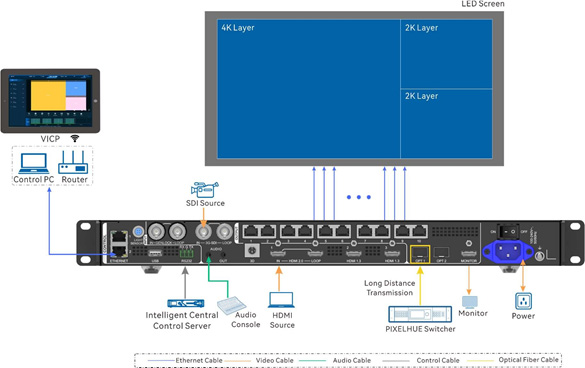
ผังการเชื่อมต่อ NovaStar VX1000 Pro
สอบถามเพิ่มเติม
| น้ำหนัก | 3.9 กก. |
|---|---|
| ขนาด | 482 × 302 × 50 เซนติเมตร |
Brand
NovaStar
สินค้าที่เกี่ยวข้อง