 Home
Home


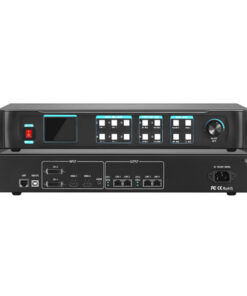
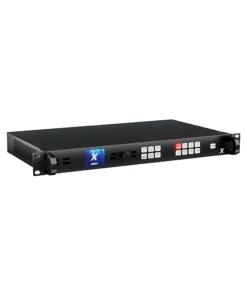
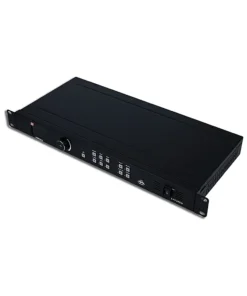
NovaStar VX2000 Pro
฿130,000.00
- เครื่อง รับ – ส่ง สัญญาณภาพ หลากหลายรูปแบบ
- รองรับการเชื่อมต่อได้ 20 ข่องสัญญาณ
- รองรับความละเอียด 16,384 x 8192 pixel
- รองรับการเล่นไฟล์ผ่าน usb flash drive ไฟล์วีดีโอ หรือ รูปภาพ
- รองรับการ back up ไฟล์
- รับประกัน 1 ปี
- Brochure : VX2000-Pro-All-in-One-Controller-Specifications-V1.2.0
หมายเหตุ : กรุณาเช็คสินค้าก่อนทำการสั่งซื้อทุกครั้ง เพราะบางรายการอาจไม่มีสินค้าในสต็อก



NovaStar VX2000 Pro VDO processor


คุณลักษณะของเครื่องรับ – ส่ง สัญญาณภาพ หลากหลายรูปแบบ Novastar vx2000 pro
- เป็นเครื่อง รับ – ส่ง สัญญาณภาพสำหรับ จอ LED FULL COLOR DISPLAY ขนาดใหญ่
- มีหน้าจอแสดงผลแบบ LCD มีปุ่มหมุน และ ปุ่มเลือกสัญญาณภาพ
- รองรับการเชื่อมต่อสัญญาณขาเข้าได้อย่างน้อยดังนี้
- ช่อง DP 1.2 x 1
- ช่อง HDMI2.0 x 2
- ช่อง HDMI 1.3 x 4
- ข่อง optical fiber port 10G x 2 (OPT 1 & OPT 2)
- ช่อง USB3.0 สำหรับเล่นภาพหรือวีดีโอ
- ช่อง Audio in x 1
- ช่องส่งสัญญาณขาออก อย่างน้อยดังนี้
- ช่อง Gigabit Ethernet x 20 ช่อง โดยรองรับความละเอียด 16,384 x 8192 pixel
- ช่อง Fiber output x 4
- ช่อง HDMI 1.3 x 1
- ช่อง 3D connector
- ช่อง Audio out x 1
- การรวมภาพสูงสุด 4K x 2K NovaStar VX2000 Pro
- มีโหมดความหน่วงต่ำ และ โหมด by pass
- รองรับการนำเข้าและส่งออกไฟล์ EDID
- ตัวเลือกแสดงผลหลากหลาย รองรับการบันทึกและโหลดค่าที่ตั้งไว้ล่วงหน้าได้ง่าย
- รองรับการตั้งค่าได้สูงสุด 265 รายการ
- รองรับการสร้าง layer ได้ และ ปรับขนาดและตำแหน่งของ layer ได้ ปรับลำดับความสำคัญของ layer ได้
- รองรับการปรับอัตราส่วนภาพได้
- มีฟังก์ชั่น OSD 4 แบบ ได้แก่ ข้อความคงที่, ข้อความเคลื่อนไหว, สภาพอากาศ, เวลา
- รองรับการปรับแต่งเนื้อหาข้อความ แบบอักษร สีแบบอักษร ขนาด ความโปร่งใส และ สีพื้นหลัง
- มีฟังก์ชั่น 3 มิติ รองรับการแสดงภาพ 3 มิติ โดยใช้แว่นตา 3 มิติ
- รองรับ HDR
- การประมวลผลวีดีโอใช้เทคโนโลยี super view III แบบไร้รอยต่อ
- รองรับการเล่นผ่าน usb flash drive
- มีฟังก์ชั่น back up (สำรองข้อมูล) กรณีเกิดไฟฟ้ามีปัญหา
- รองรับการทำงานแบบ 24/7
| Function | Limitation NovaStar VX2000 Pro | Mutually Exclusive Function |
| 3D | l Work with the matched 3D glasses.
l When the 3D function is enabled and the video source format is Side-by-Side or Top-and-Bottom, the device output capacity will be halved. |
l Input crop
l HDR |
| Low Latency | All cabinets loaded by Ethernet ports must be aligned at the top of the circumscribed rectangle. | Genlock: When the device works as a video controller, the low latency and Genlock are not exclusive.
When the device works in ByPass mode, the two functions cannot be enabled simultaneously. |
| GENLOCK | N/A NovaStar VX2000 Pro | Low latency: When the device works as a video controller, the low latency and Genlock are not exclusive. When the device works in ByPass mode, the two functions
cannot be enabled simultaneously. |
| ByPass Mode | When the device works as an independent LED display controller, the video processing
function is unavailable. |
N/A |
| HDR | Use the layer 1 source as an HDR source. | 3D |
| OSD | l The quantity of the text OSD components is as follows.
− Static text OSD: 10 − Dynamic text OSD: 1 − Weather OSD: 2 − Time OSD: 2 l The text OSD and image OSD cannot be used together. l The dynamic text OSD and other text OSD components cannot be used together. |
Remote control |
แผงด้านหน้าเครื่อง Novastar vx2000 pro

| No. | Area NovaStar VX2000 Pro | Function NovaStar VX2000 Pro |
| 1 | Input source buttons | l Show the input source status and switch the layer input source.
l Button indicators are used to indicate the working status of the input source signal. − On (blue): The input source has a signal. − Flashing (blue): The input source has no signals, but it is used by a layer. − On (white): The input source is not used, and no input signal is accessed. l U-DISK: USB source button Press the button to switch to a USB source, while hold down the button to enter the Input Settings screen. l MEDIA: USB player button Press the button to enter the USB Player screen.
On the home screen, when layer 1 is opened, you can press the input source button to quickly switch the input source for layer 1. |
| 2 | LCD screen | Display the device status, menus, submenus and messages. |
| 3 | Knob | l Rotate the knob to select a menu item or adjust the parameter value.
l Press the knob to confirm the setting or operation. |
| 4 | Back button | Exit the current menu or cancel the operation. |
| 5 | Layer buttons | Layer button description:
l LAYER 1~3: Open or close a layer, and show the layer status. − On (blue): The layer is opened. − Flashing (blue): The layer is being edited. − On (white): The layer is closed. l When you play media files saved in a USB drive, the layer buttons are used to control the playback. − LAYER-1: This button is used to play or pause the files. − LAYER-2: This button is used to stop the playback. − LAYER-3: This button is used to play the previous file. |
| l SCALE: A shortcut button for the full screen function. Press the button to make the layer of the lowest priority fill the entire screen.
− On (blue): Full screen scaling is turned on. − On (white): Full screen scaling is turned off. l When you play media files saved in a USB drive, this button is used to play the next file. |
||
| 6 | Function buttons | l PRESET: Access the preset settings menu.
l TEST: Access the test pattern menu. l FREEZE: Freeze/unfreeze the output image. l FN: A custom function button |
| 7 | USB | Connect to the PC installed with NovaLCT for device control. |
| 8 | U-DISK | 1x USB 3.0
l Supports USB playback. − Single-partition USB drive supported − File system: NTFS, FAT32 and exFAT − Max. width and height of media files Width: 3840 pixels, height: 2160 pixels − Picture format: jpg, jpeg, png and bmp − Decoded image resolution: 3840×2160 or lower − Video format: mp4, mkv, mov, avi, flv, m4v, mpg, mpeg, ts − Video coding: H.264, H.265, MPEG-2, MPEG-4 − Max. video frame rate: H.264: 3840×2160@30fps, H.265: 3840×2160@60fps MPEG-2/MPEG-4: 1920×1080@60fps − Max bitrate: |
| H.264/H.265: 100Mbps MPEG-2/MPEG-4: 50Mbps
− Audio coding: AAC, AC3, DTS, MP3, DVD, DVD_LPCM, MP2, OPUS − Audio sampling rate: opus: 24kHz, 48kHz Other formats: 22.05kHz to 94kHz − Transition effect of image switching: Ripple, zoom in, cut out, flip, blinds, H wipe, V wipe, cube, dissolve, grid, swapping, scroll, fade in/out, twirl, heart trans, doorway, perspective triangle, disappear, bounce, pinwheel, random The resolution of a USB source is fixed at 3840×2160@60Hz. |
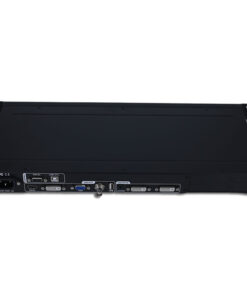
ด้านหลังเครื่อง novastar VX2000 Pro

| Input Connectors | ||
| Connector | Qty | Description NovaStar VX2000 Pro |
| DP 1.2 | 1 | 1x DP 1.2
l Max. input resolution: 4096×2160@60Hz l Supported frame rate: 23.98/24/25/29.97/30/47.95/48/50/56/59.94/60/70/71.93/72/75/85/100 /119.88/120/144 l Custom resolutions supported − Max. width: 8192 pixels (8192×1080@60Hz) |
| − Max. height: 8188 pixels (1080×8188@60Hz)
l Supports 8-bit/10-bit/12-bit video inputs. l Supported color space/sampling rate: RGB 4:4:4/YCbCr 4:4:4/YCbCr 4:2:2 l HDCP 1.3 supported l Accompanied audio supported l Does not support interlaced signal inputs. |
||
| HDMI 2.0 | 2 | 2x HDMI 2.0
l Max. input resolution: 4096×2160@60Hz l Supported frame rate: 23.98/24/25/29.97/30/47.95/48/50/56/59.94/60/70/71.93/72/75/85/100 /119.88/120/144 l Compatible with HDMI 1.4 and HDMI 1.3 video inputs l Custom resolutions supported − Max. width: 8192 pixels (8192×1080@60Hz) − Max. height: 8188 pixels (1080×8188@60Hz) l Supports 8-bit/10-bit/12-bit video inputs. l Supported color space/sampling rate: RGB 4:4:4/YCbCr 4:4:4/YCbCr 4:2:2/YCbCr 4:2:0. l HDCP 1.4 and HDCP 2.2 supported l Accompanied audio supported l Does not support interlaced signal inputs. |
| HDMI 1.3 | 4 | 4x HDMI 1.3
l Max. input resolution: 1920×1080@60Hz l Supported frame rate: 23.98/24/25/29.97/30/47.95/48/50/56/59.94/60/70/71.93/72/75/85/100 /119.88/120 l Custom resolutions supported − Max. width: 2048 pixels: 2048 pixels (2048×1080@60Hz) − Max. height: 2048 pixels 2048 pixels (1080×2048@60Hz) l Supports 8-bit video inputs. l HDCP 1.4 supported l Supported color space/sampling rate: RGB 4:4:4/YCbCr 4:4:4/YCbCr 4:2:2 l Accompanied audio supported l Does not support interlaced signal inputs. |
| 12G-SDI | 1 | 1x 12G-SDI |
| l ST-2082 (12G), ST-2081 (6G), ST-424 (3G), ST-292 (HD) and ST-259
(SD) standard video inputs supported l Max. input resolution: 4096×2160@60Hz l 12G-SDI loop output supported l Deinterlacing processing supported l Does not support input resolution and bit depth settings. |
||
| *Connector capacity limitations | l SL
− Standard resolution: 1920×1080@60Hz − Custom max width: 2048 (2048×1080@60Hz) − Custom max height: 2048 (1080×2048@60Hz) l DL − Standard resolution: 3840×1080@60Hz/3840×2160@30Hz − Custom max width: 4096 (4096×1080@60Hz) − Custom max height: 3840 (1080×3840@60Hz) l 4K − Standard resolution: 4096×2160@60Hz/8192×2160@30Hz − Custom max width: 8192 (8192×1080@60Hz) − Custom max height: 8188 (1080×8188@60Hz)
If the resolution of an input source is larger than the max width limit of the connector capacity, you need to switch the connector capacity to ensure that the input source can be processed normally. |
|
| Output Connectors | ||
| Ethernet ports | 20 | l Max. loading capacity: 13 million pixels
l Max. width: 16,384 pixels, max. height: 8192 pixels l Maximum capacity of a single port: 650,000 pixels (output bit depth: 8bit) 480,000 pixels (output bit depth: 10bit) l Supported frame rate: 23.98/24/25/29.97/30/47/48/50/59.94/60/71.93/72/75/85/95/100 /119.88/120/144 |
| OPT | 4 | 4x 10G optical fiber ports
l The function of the optical fiber port is different depending on the device working mode. − OPT 1/2: Self-adaptive, either for video input or for output |
| − OPT 3/4: For output
OPT 3 sends the output on Ethernet ports 1~10. OPT 4 sends the output on Ethernet ports 11~20. l Supports the following three modes: − Input+output: OPT 1/2 for video input, while OPT 3/4 copies or backs up the output on Ethernet ports − Input+loop+output: OPT 1 for video input, OPT 2 for loop output, while OPT 3/4 copies or backs up the output on Ethernet ports − Output: OPT 1/2 sends the output on Ethernet ports, while OPT 3/4 copies or backs up the output on Ethernet ports. l Paired with single-mode and dual-mode optical modules with the following transmission distance − Single-mode twin-core optical module: ≤10 km − Multi-mode twin-core optical module: ≤300 m
The optical module is not installed at the factory. Please purchase and install it as needed. |
||
| HDMI 1.3 | 1 | For monitoring display
The monitoring image definition supports Smooth and High-Definition. |
| 3D | 1 | 1x 3D connector
Connect the 3D emitter and use the compatible 3D glasses to enjoy a 3D visual experience. When the 3D function is enabled and the video source format is Side-by- Side or Top-and-Bottom, the device output capacity will be halved. |
| Audio Connectors | ||
| Connector | Qty | Description |
| AUDIO | 2 | 1x AUDIO input, 1×AUDIO output
l 3.5 mm standard audio input and output connectors l Audio sampling rate up to 48 kHz |
| Control Connectors | ||
| Connector | Qty | Description |
| ETHERNET | 2 | l Connect to the control PC for device control and firmware upgrade via Unico.
Status LEDs: |
| l The top left one indicates the connection status.
− On: The port is properly connected. − Flashing: The port is not properly connected, such as loose connection. − Off: The port is not connected. l The top right one indicates the communication status. − On: No data communication. − Flashing: The communication is good and data is being transmitted. − Off: No data transmission |
||
| USB | 1 | 1x USB 2.0 NovaStar VX2000 Pro
l Cascade the devices via the USB port and Ethernet port. Up to 5 devices can be cascaded. l Update the firmware via the USB drive. l Import or export device logs and EDID files. |
| RS232 | 1 | 3-pin connectors NovaStar VX2000 Pro
l RX: Receive signals. l TX: Send signals. l G: Ground |
| GENLOCK IN- LOOP | 1 | Connect to an external sync signal. Accepts bi-level and tri-level signals.
l IN: Accept the sync signal. l LOOP: Loop the sync signal. l Genlock signal frame rate: 24 to 60Hz |
| LIGHT SENSOR | 1 | Connect to a light sensor to collect the ambient brightness, allowing for automatic screen brightness adjustment. |
ผังการเชื่อมต่อ novastar vx2000 pro

ขนาดเครื่อง novastar vx2000 pro
| Electrical Parameters | Power connector | 100-240V~, 50/60Hz, 2.5A-1.0A |
| Rated power consumption | 83 W | |
| Operating Environment NovaStar VX2000 Pro | Temperature | 0°C to 50°C |
| Humidity | 5% RH to 85% RH, non-condensing | |
| Storage Environment NovaStar VX2000 Pro | Temperature | –10°C to +60°C |
| Humidity | 5% RH to 95% RH, non-condensing | |
| Physical Specifications NovaStar VX2000 Pro | Dimensions | 482.6 mm × 493.0 mm × 94.6 mm |
| Net weight | 7.4 kg | |
| Total weight (packed with paper box) | 11.2 kg | |
| Total weight (packed with flight case) | 19.9 kg | |
| Packing Information | Packing box | 645 mm × 580 mm × 215 mm |
| Flight case | 722.4 mm × 547.8 mm × 165.8 mm | |
| Accessories NovaStar VX2000 Pro | 1x Power cord, 1x Ethernet cable, 1x HDMI cable, 4x Silicone dustproof plugs, 1x USB cable, 1x Phoenix
connector, 1x Quick Start Guide, 1x Certificate of Approval, 1x Safety Manual |
|
| Accessories (Optional) | 1x Remote control NovaStar VX2000 Pro
Please purchase the remote control as needed. (Item code: M07020005) |
|
| Noise Level (typical at 25°C/77°F) | 45 dB (A) | |
สอบถามเพิ่มเติม
| น้ำหนัก | 7.4 กก. |
|---|---|
| ขนาด | 482 × 493 × 94.6 เซนติเมตร |
Brand
NovaStar
สินค้าที่เกี่ยวข้อง